Appearance
Interfaces and Functions
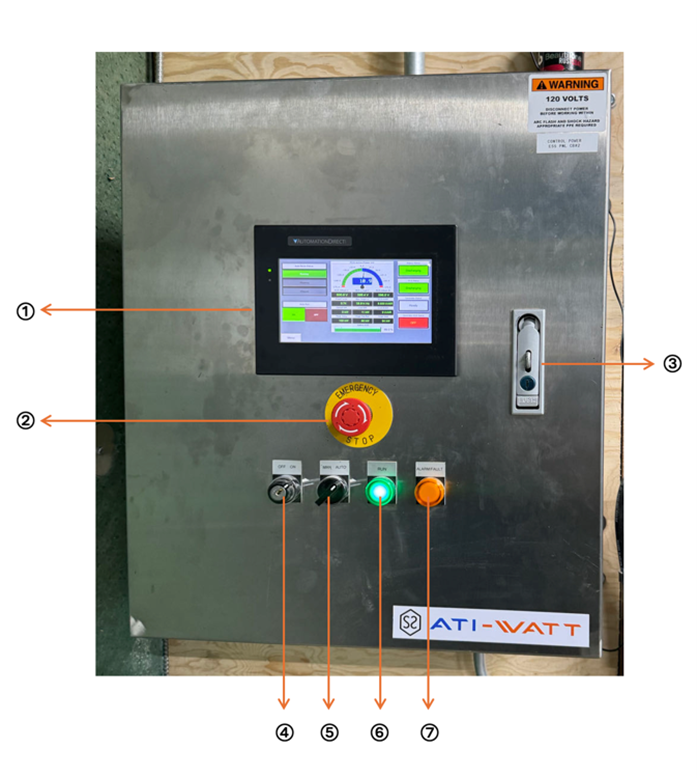
| # | Name | Description |
|---|---|---|
| 1 | Human Machine Interface (HMI) | Provides access to system information and allows parameter adjustments for system operations. |
| 2 | Emergency Stop Button | Designed for use in emergency situations. Press the button to immediately halt system operations. To reset, rotate the button after the situation is resolved. |
| 3 | Cabinet Lock | Lock/Unlock the Cabinet door. |
| 4 | Panel Power Switch | Controls the power supply to the cabinet. Unlock with a key to toggle the power on or off. |
| 5 | Manual/Auto Switch | Enables switching between manual operation and automatic mode, depending on the system's required control setting. |
| 6 | RUN Indicator | Illuminates when the system is actively running, signaling normal operational status. |
| 7 | Alarm Fault Indicator | Activates when a system fault or error occurs, providing a visual alert for troubleshooting and maintenance. |